Roles
Roles help you specify certain permissions for certain ranks. Here is how to get started.
Creating a Role
Creating a role is easy. Go to Settings -> Roles and click "+ Create Role".
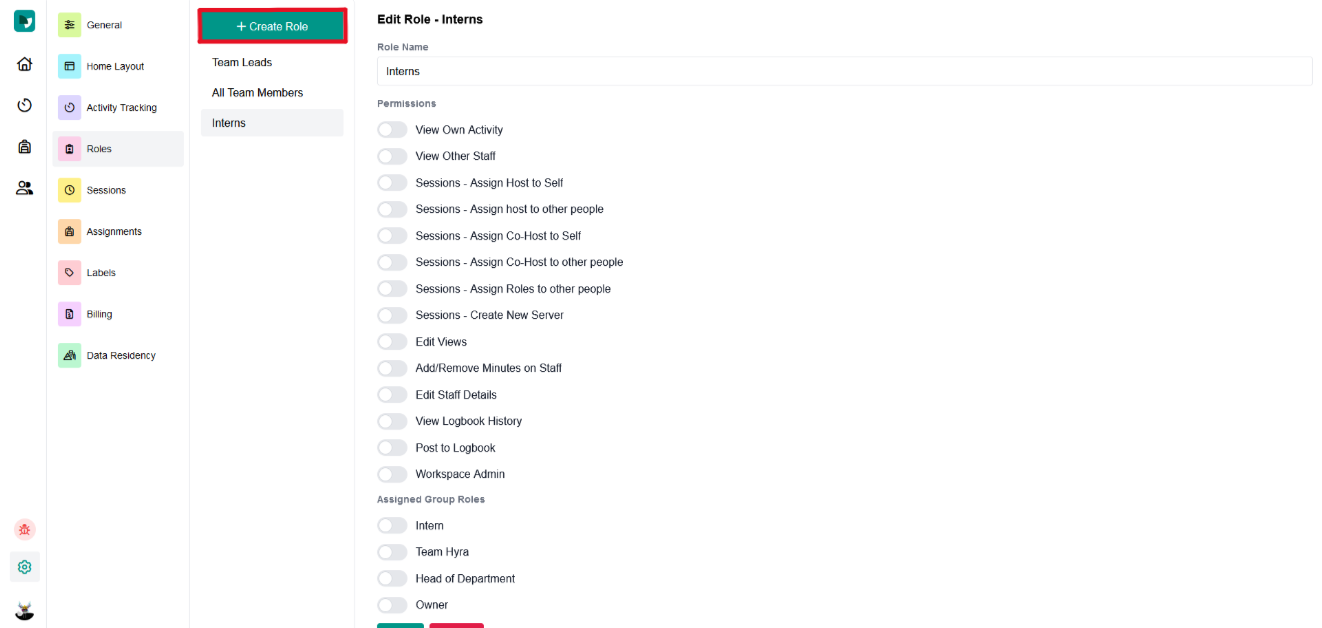
Once created, assign a name, select their permissions, and assign it to a rank(s).
Permissions
In the Roles settings, there are plenty of permissions to give to your staff, with more on the way. So here's a little guide to help you identify what permissions are appropiate for different roles.
Warning:
Please note that some of these permissions labeled with an asterisk (*) can be abusive towards other workspace members.
Basic Permissions
| Permission | What Does it do? |
|---|---|
| View on Activity | The ability to view the Activity Tab. They could also join and leave sessions. |
| View Other Staff | The ability to view the Staff Tab. They could also look up other staff but they cannot give or take minutes. |
| View Logbook History | The ability to view the Logbook History of a staff. |
Session Permissions
| Permission | What Does it do? |
|---|---|
| Assign Host to Self | The ability to make themself the session host. |
| Assign Co-Host to Self | The ability to make themself the session co-host. |
| Assign Host to Other People* | The ability for the them to assign anyone as the session host. |
| Assign Co-Host to Other People* | The ability for them to assign anyone as the session co-host. |
| Assign Roles to Other People* | The ability for them to assign anyone to any of the additional session roles. |
| Create New Server | The ability for them to create a new server. |
Advanced Permissions
| Permission | What Does it do? |
|---|---|
| Edit Views | The ability to create, edit, and delete views. |
| Add / Remove Minutes on Staff* | The ability to add or remove minutes from anyone. |
| Edit Staff Details* | The ability to edit anyone's details in their staff profile. |
| Post to Logbook* | The ability to post on someone's logbook. |
| Workspace Admin* | The ability to manage the workspace through the settings. |